Curious about how many seeds you'll need to order to ensure you have enough to cover your planned crops? You can use the Estimated Seed Order report to find out! Just navigate to Reports, select the Plantings tab, and then run the Estimated Seed Order report.
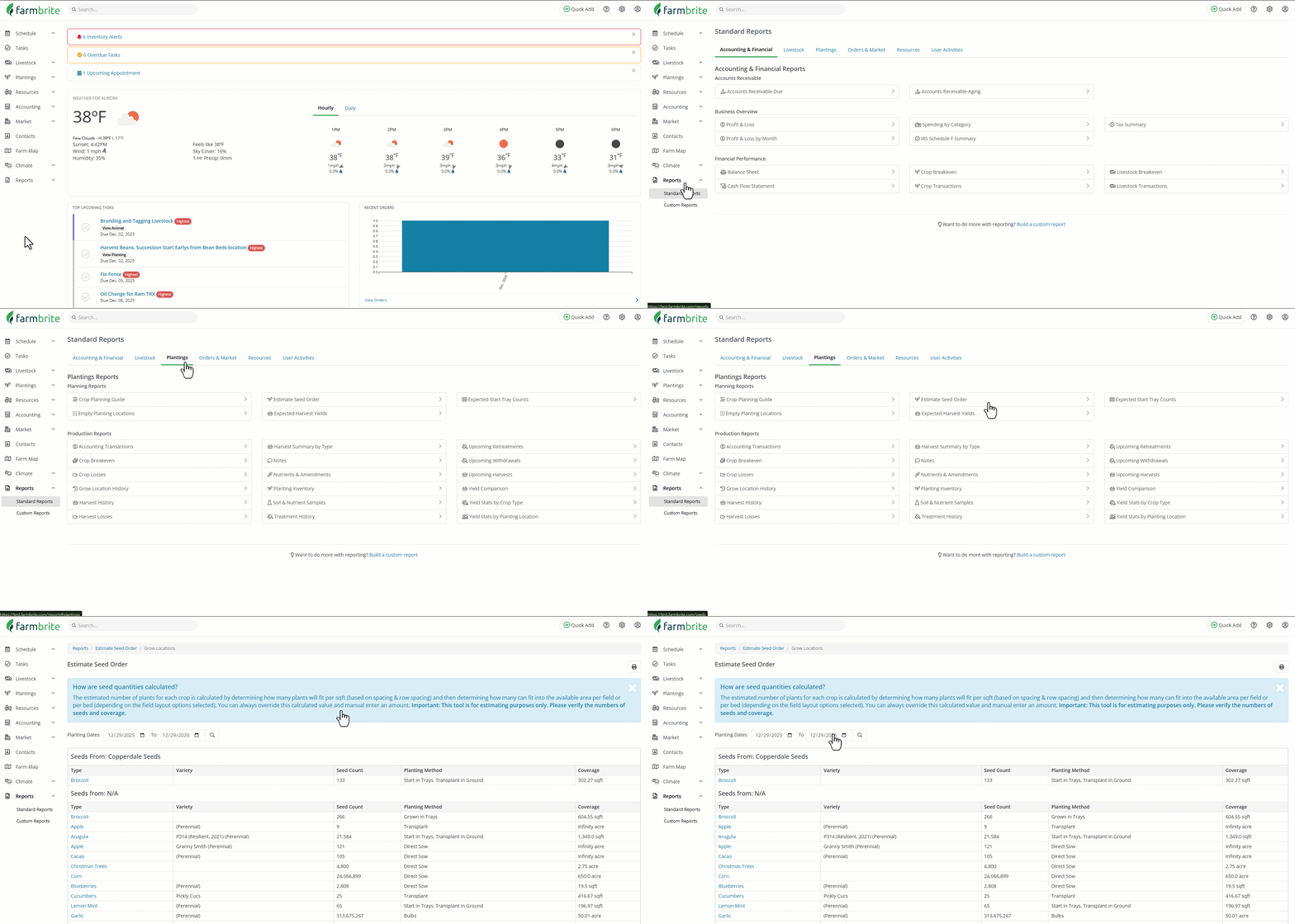
How are seed quantities calculated?
Seeds quantities are calculated in two ways;
- Using the manual numbers you entered with your plantings (Number of Plants)
- Using the field layout tool, we calculate the number of plants (seeds) per linear foot. This is based on the spacing you entered when creating a plant type multiplied by the total linear foot of plantings from the layout tool by the number of plants per linear foot. Example: 12/spacing_inches) * total_linear feet.
To view the seed order estimates for a given year, simply set the date range at the top of the report. Farmbrite will then calculate seed / start orders for each plant you’ve entered for that year. If you provided information about the seed company on the Master Plant List you’ll see the plants organized by seed company, making it easy to coordinate orders with each vendor.
For each plant type listed you’ll see the following information:
- Plant Type
- Plant Variety
- Seed Count
- Planting Method
- Coverage
Important: This tool is for estimating purposes only. Please verify the numbers of seeds and coverage.